A Beginner's Guide to the Enchantee Calligraphy Font
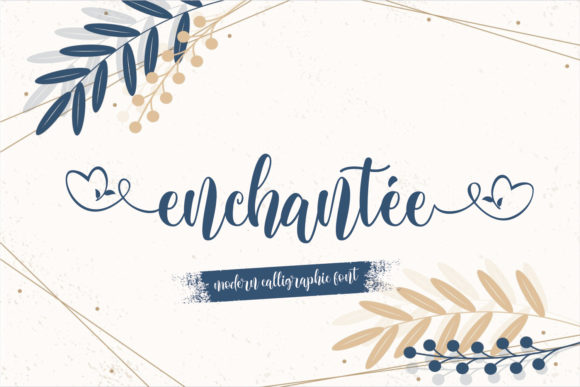
If you’re looking to add a touch of timeless elegance to your designs, the Enchantee font offers a beautifully crafted solution. It is a digital script font meticulously designed to evoke the charm of classic handwritten calligraphy. Unlike many rigid or overly uniform digital scripts, Enchantee feels fluid and artistic, with a varying baseline and smooth, flowing lines that mimic the natural motion of a pen.
Why Enchantee Stands Out for Creators
Enchantee's primary appeal lies in its balance of sophistication and accessibility. It captures the ornate beauty of traditional calligraphy but in a format that’s readily usable across modern software and platforms. The font’s design is packed with gorgeous glyphs and stunning alternates, giving you the flexibility to customize how letters look. This means you can avoid repetitive, cookie-cutter text and create compositions where each word has its own unique character.
A key technical feature that makes this possible is its PUA encoding. For beginners, this simply means that all those special decorative letters and swashes are built directly into the font file. You don’t need advanced software skills to use them; they can typically be accessed through the glyph panel in common programs like Adobe Illustrator, Photoshop, or even through character maps in word processors. This removes a major barrier for casual users and hobbyists who want professional-level embellishment without a steep learning curve.
Practical Uses for the Enchantee Font
The applications for Enchantee are vast because its elegance is versatile. It supports both personal expression and commercial polish.
For Personal and Lifestyle Projects
Imagine designing your own wedding invitations, where the names of the couple flow together with graceful ligatures. Or creating a custom recipe book where section titles have that handwritten warmth. Bloggers can use Enchantee for post titles or featured quotes to break up the visual monotony of standard text and draw readers in. Even a simple birthday card becomes a memorable keepsake when the message is set in this charming script.
In Professional and Business Contexts
For entrepreneurs and small business owners, Enchantee can elevate brand materials without overhauling an entire identity. It’s perfect for highlighting key messages rather than being used for long paragraphs. Consider using it for your logo text if your brand is in beauty, crafts, or luxury goods. Marketers might deploy it in social media graphics for promotional slogans or in email campaign headers to create a more personal, crafted feel. Educators and freelancers can use it to design attractive course certificates, presentation titles, or portfolio website headers that stand out.
The font also includes a wealth of special features like alternate glyphs and ligatures. These allow you to solve common design problems. For instance, if two letters next to each other look awkward in their standard form, a built-in ligature might seamlessly connect them. Alternate glyphs let you choose a different style for a specific letter—perhaps a more ornate ‘a’ or a simpler ‘g’—to better fit the space or mood of your design.
Important Considerations Before Using Enchantee
While Enchantee is remarkably user-friendly, there are a few practical points to keep in mind to ensure the best results.
First, it is a script font. Its strength is in display purposes—for titles, logos, short phrases, and decorative elements. It is not designed for body text or lengthy reading paragraphs. Using it for large blocks of text would be difficult to read and could diminish its elegant impact.
Second, leverage its alternates and swashes thoughtfully. The abundance of options is a gift, but restraint often leads to more cohesive designs. You might choose one or two swashed letters per word to serve as focal points rather than embellishing every single character. Start simple and experiment.
Finally, consider contrast and background. The delicate lines and varying baseline of Enchantee need clear space to shine. Ensure it is placed against a simple, uncluttered background and with sufficient color contrast to remain legible, especially in digital formats where screen resolutions vary.
Getting Started with Your First Project
A great beginner-friendly exercise is to create a simple quote graphic. Open your design software, set a short, meaningful quote using Enchantee as the font. Then, open the glyph panel (often under ‘Window’ or ‘Type’ menus). Scroll through the available characters to find an alternate capital letter for the first word or a beautiful swash for the terminal letter of the last word. Swap them in. You’ll immediately see the transformation from standard digital text to something that feels uniquely crafted. This hands-on approach helps you learn the font’s capabilities in a low-pressure, creative way.
Enchantee bridges the gap between the aspirational art of calligraphy and the practical needs of today’s creators. Its design acknowledges that elegance in communication isn’t about complexity, but about thoughtful details—the gentle curve of a line, the graceful connection between letters. Whether you’re a hobbyist making a gift, a professional polishing a brand, or an educator designing engaging materials, Enchantee provides a tool to infuse your work with a sense of refined, personal touch.